Phase 3
Implementation Plan for Lessons and Activities
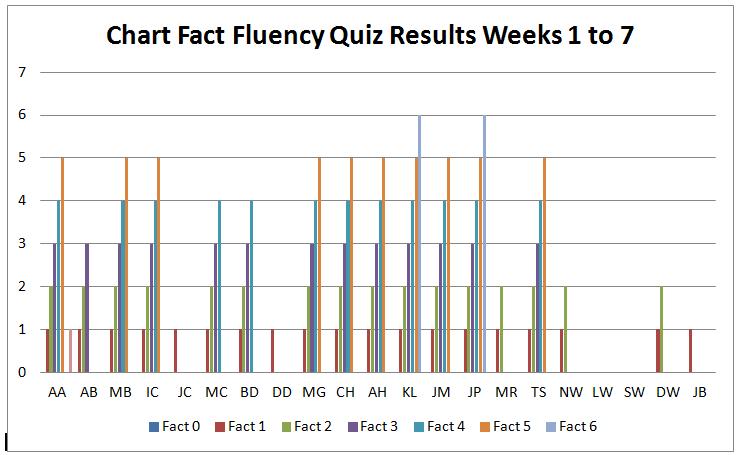
At this point in the year the students have taken six paper-and-pencil quizzes on basic multiplication facts from 1 through 12. These weekly 2-minute timed multiplication quizzes consisted of 25-questions on one fact each. Out of a class of 22 students only two have passed each quiz with 100% accuracy. The graph below indicates that students "SW" and "LW" have passed none of the quizzes given prior to technology intervention. This demonstrates a genuine need for further practice of basic multiplication. In fourth grade the curriculum assumes these facts have already been learned so time is not allotted to teach basic multiplication. These students are struggling with higher math concepts because they have not yet mastered basic multiplication facts. These basic facts are taught in lower grades and not covered in our fourth grade class. A real need exists for an intervention program so students can be given opportunities to practice their facts and to learn them with automaticity.
Technology Resources
The following resources are necessary for the implementation of this math intervention project.
1. Computers: The classroom computer center consists of six desktop computers with internet access. Each computer has the latest version of Internet Explorer installed. Each computer has its own mouse, keyboard, volume control, and headphones. One computer has a specially designed form of assistive technology; a keyboard with extra large keys for one student with physical disabilities. Each computer is located in the classroom so student work can be monitored at all times by the teacher or special education teacher assistant. Using a Big Keys keyboard (Vision Board 2 from Chester Creek Technologies) promotes academic equality and independence for students with disabilities and those who find using a regular keyboard difficult.
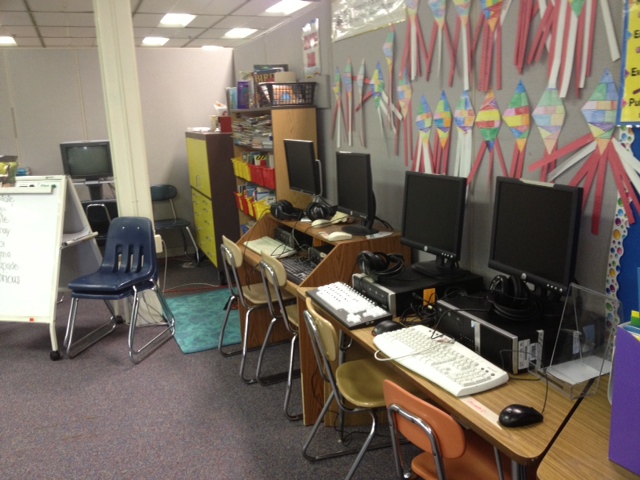
Bank of computers in the classroom are used for technology based intervention. Photo by LTavares
2. Assistive Technology: A document camera is available for students with visual impairments. The camera is an optical magnifier called Clear View+. This document camera enlarges images for visually impaired students who may have difficulty with the paper and pencil quizzes. When a worksheet is placed on a movable table below the camera, the image is enlarged and shown on the video screen so the student can better see what he is reading and writing. This electronic optical magnifier is located in the classroom so the student may work independently on assessments.
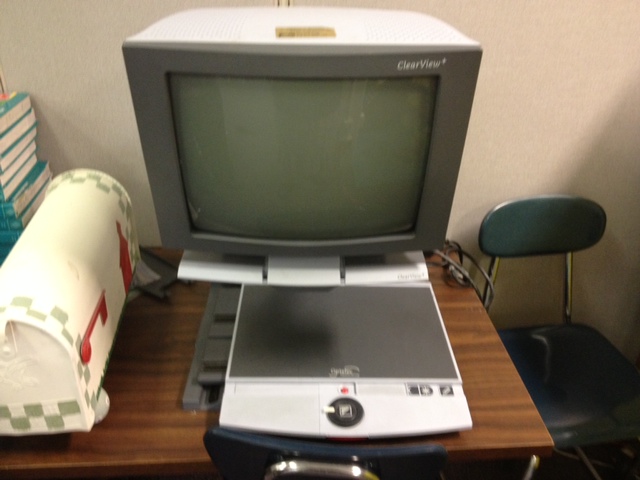
Assistive technology ClearView+ document camera used by students with visual impairments. Photo by LTavares
3. Smart Board: The Smart Board hardware is attached to my computer and the desktop is projected onto a large screen. The Smart Board is used to show students how to access the web resources and how to navigate through the lessons, practice sessions, and interactive math activities. There is one Smart Board in the classroom, so during the presentation and explanation of the intervention project, students can all see and attend to the lesson while they are seated at their desks.
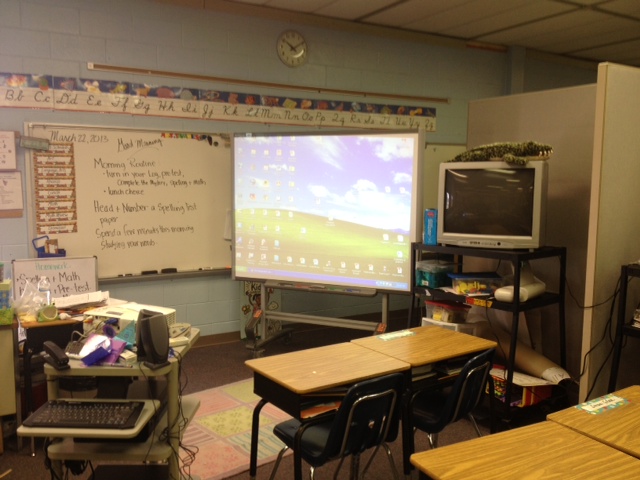
Classroom Smart Board used for whole-class instruction. Photo by LTavares
4. School-wide computer laboratories: The elementary school where this intervention takes place has three separate computer labs. One lab is in the Media Center where there are 20 computers, one is the school’s computer lab with 25 computers, and one is a laptop lab with 25 computers. Students in this mathematics intervention group will use these computer labs in an informal way to further participate in this project. An example of informal use would be during the times when indoor recess offers an opportunity for all students to use the Media Center to play educational games. During these times the intervention group will practice their multiplication facts on the intervention website. As part of their routine schedule, all students have classes once per week in the computer lab with a technology resource teacher. During this class the intervention group will spend fifteen minutes working on their multiplication intervention practice.
Access Plan
The population which makes up this study group includes two students with special needs, and assistive technology is required. These students will access this project using the Big Keys keyboard and the document camera which projects an enlarged image. One student who is also visually impaired will access the computer using an enlarged image on the computer monitor (simply by using the control + keys to enlarge the image on the screen). All students will use headphones. Two students in the program require time and a half on all tests and will be given additional time on the formative and summative assessments. All of the assistive technologies and supplemental aids are in keeping with their Individual Education Programs (IEP). Three teachers will be monitoring the students as they access information on the computers and take part in the online learning activities. In addition to myself, the special education teacher will monitor and assist students as needed and the technology specialist, who teaches weekly lessons in the computer lab, will support this project by placing an icon on the desktops of the six students participating in the intervention and monitoring them during their lesson and practice time in her laboratory. To ensure each student is successful with the intervention plan and can easily access the content of the website, students were given a teacher led instruction using the Smart Board. Each part of the website was demonstrated and student questions answered.
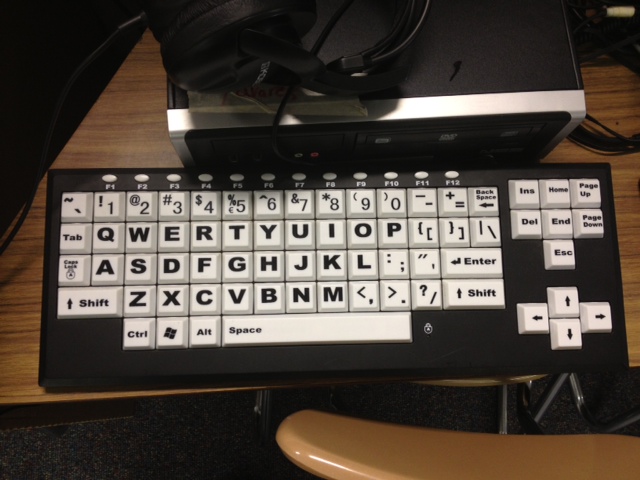
Big Keys keyboard used by students with physical disabilities. Photo by LTavares
Strategies Based on Directed Models
Direct model strategies of instruction are used when objectives focus primarily with structured learning products such as drills, tutorials, and integrated learning systems (Doering & Roblyer, p. 40). It is for this reason a direct strategies method best matches my objectives. According to authors M.D. Roblyer and Aaron Doering (2013) directed instructional models stress individual work and have skill-based instructional goals (p. 47). The lesson activities included in my technology-based intervention focus on the specific skill of multiplication calculations and the students work independently. Portions of this intervention project use traditional teacher-directed methods such as lessons pertaining to accessing the website resources. Also, the lessons use materials including skill worksheets and involve students learning a prerequisite skill (basic facts) to help them understand a new skill (division)--which is also indicative of directed strategy methods.
· A directed model is called for when teachers need to integrate methods of teaching to remedy identified weaknesses or skill deficits (Doering & Roblyer, p. 48). Through a series of quizzes I have identified weaknesses with several students (a lack of understanding what multiplication really means), and have designed a lesson plan with technology-based activities to help solve this skill deficit.
· A directed model is recommended when teachers need to integrate lessons to promote skill fluency or automaticity (Doering & Roblyer, p. 48). The students will be given to opportunity to practice multiplication facts to build this skill fluency and learn the facts with automaticity while they take part in the intensive structure of my technology-based workshops; on a regular basis and as a part of at-home support.
· A directed model is when lessons are integrated to support efficient, self-paced instruction and self-paced review of concepts (Doering & Roblyer, p. 48). All of the lessons in my technology intervention plan allow students to advance at their own pace and revisit lessons for clarification. I have carefully chosen resources which allow students to work independently. According to authors M.D. Roblyer and Aaron Doering (2013), “Materials such as drill-and-practice and tutorial software have proven to be valuable resources for providing this kind of individualized instruction”(p.48).
In summary, technology integration strategies based on directed models includes lesson activities that allow students to work independently and at their own pace, target specific skill deficits, and are especially beneficial when the learning outcome is centered around prerequisite skills which must be applied quickly and with automaticity (such as being able to recall multiplication facts).
Instructional Integration
The learning issues identified in Phase 1 of this Capstone Project are:
1. are lacking in basic mathematics skills including math fact recall with automaticity and math fact fluency and;
2. who are having difficulty with memorizing multiplication facts which contributes to misunderstandings of division concepts, decimals, and fractions.
The following activities target these specific learning issues.
Other than during whole group instruction, the six students participating in the intervention program will primarily study independently. Each student will utilize the lesson differently based on their particular educational needs. They will work on an individual basis using their own computer. The program consists of 6 parts: 1) a multiplication pre-assessment, 2) whole group directed instruction, 3) technology based independent workshop, 4) graphing and predicting, 5) formative and summative assessments, and 6) project extension at home.
1) Pre-assessment—the whole class will take a forty question multiplication test prior to any interventions. This 4-minute timed test will be used to identify the six students who are struggling most with multiplication fact recall and fluency. The six students identified as having the greatest learning need will be chosen to take part in the math multiplication fact intervention program.
2) Whole Group Instruction—direct instruction used by the teacher to demonstrate how to navigate the learning intervention website, how to follow the directions and step-by-step procedures, to answer questions, to make sure students are properly prepared for the kind of independent work expected, and to make sure they are comfortable practicing when they are outside of school. An additional purpose is to encourage those students not taking part in the intervention program to utilize the contents of the website on an out of class basis to help improve their fluency with multiplication facts as well. This whole group instruction will last for one 15-minute session.
3) Independent workshop—students will work independently on desktop computers using the learning intervention website created for this project. They will navigate the website and take part in the interactive activities focused on understanding multiplication and practicing their basic multiplication facts from 1 through 12. During this independent work time the students will take part in differentiated lesson activities specific to their independent learning needs identified through quizzes. Students who have a clear understanding of what multiplication means will begin their exercises with the facts they are struggling with most. The students who lack an understanding of the meaning of multiplication will begin with virtual lessons. The virtual lessons are aimed at providing animated explanations of equal groups being combined to find a product and how multiplication is a short cut for repeated addition.
Differentiation of lesson activities will be based on weekly formative assessments given as a 25 question, two-minute timed quiz each Friday. The quiz is administered to gauge students' on-going progress and to determine the starting point for each weeks lessons. After grading the quizzes the students will continue lessons based on their learning needs. Once they have successfully answered all 25 questions, they will proceed to the next set of multiplication fact lessons. Each independent work time session will last 15 minutes. Each session will be conducted every Tuesday through Friday with two sessions taking place on Wednesday. The total weekly time spent on technology-based independent practice time will be 75 minutes (see the calendar).
To make sure students have one place to access the lesson activities, a technology web site hub was created. Here the students can watch a screen-cast presentation that guides them through navigating the website with step-by-step instructions explaining what they should do first on the website and where they should go to access lessons.
Please click on the image/link below to access the website students will be using to learn their multiplication facts.
To visit the Math Intervention Website, click on the image above.
4) Graphing and Predicting—at the conclusion of each weekly 2-minute timed quiz the students will chart their progress on a graph called “My Fact Check Progress Graph”. They will create a graph that lists the fact their quiz assessed and the number of questions they answered correctly (1 through 25). They will use a red colored pencil to shade a column on the graph to represent the number of questions they answered correctly. Then they will make a prediction about their success on the next quiz they take. They will use a green pencil to shade in the adjacent column to show their prediction. In this way, they students will continually collect data regarding their progress to motivate them to learn their multiplication facts. These activities support the following objective:
Objective Statement: At the conclusion of each weekly quiz, given as part of a technology-based intervention program, the students will create a graph charting their growth and progress toward their ability to compute multiplication problems of basic multiplication facts from 1 through 12 with automaticity as demonstrated on a 25 question paper and pencil quiz given weekly.
5) Formative and Summative
Assessments—since the goal of this intervention is to have students increase
their knowledge of multiplication and strengthen their math fact recall with automaticity,
their progress toward this goal will be monitored using weekly quizzes given
each Friday. Once students complete the weekly online independent learning
activities they will be given a 2 minute timed paper and pencil quiz
having 25 basic multiplication questions. The results of these quizzes will
provide feedback needed to identify student’s strengths and weaknesses and will
indicate the focus for additional lessons. The summative assessment will be a
duplicate of the pre-test and will be given at the conclusion of the
intervention program. This post-test will demonstrate the student’s ability to
compute multiplication facts from 1 through 12 with automaticity. The test will
be a 40 question paper and pencil final exam, timed for 4 minutes and if the
students answer with 90% accuracy, the intervention program will be considered
a success. These assessments support the following objective statements:
Objective Statement: By completing the weekly online activities the students will demonstrate their ability to compute multiplication problems by correctly answering 25 multiplication questions on a paper and pencil quiz given weekly in order to exercise the skills of multiplication with 95% accuracy.
Objective Statement: At the conclusion of the computer based intervention program the students will be able to demonstrate their ability to compute multiplication problems of basic multiplication facts from 1 through 12 with automaticity as demonstrated on a 40 question paper and pencil final exam and with accuracy of 90%.
6) Project Extension at Home—at home support will be used throughout this program. A parent letter sent home requests parental involvement in this intervention program. The letter is sent to the parents of students taking part in the intervention and who have access to the internet in their home (of which all six of them do). The online technology based practice becomes part of the students’ routine homework assignments and consists of additional 10 minutes of nightly practice time on a voluntary basis. This parent-school communication idea came from parents who expressed their desire to support their children at home and have been searching for ways to help their children learn their multiplication facts when traditional flash card practice and memorization have failed. Once the parents learned about the in-school intervention program being undertaken in my classroom, they seemed eager and excited to take part at home (see parent letter below).
Implementation
The pre-test and whole group instruction will take place on April 1, 2013. The independent technology based workshops will begin on April 2nd and continue until the end of the school year on June 7 or until each student has met the required objective of scoring 90% or greater on the post assessment. The intervention students will have five technology intervention sessions each week and each session will last for fifteen minutes. The total intervention time each week will be 75 minutes. The schedule below indicates the dates and times for each session.
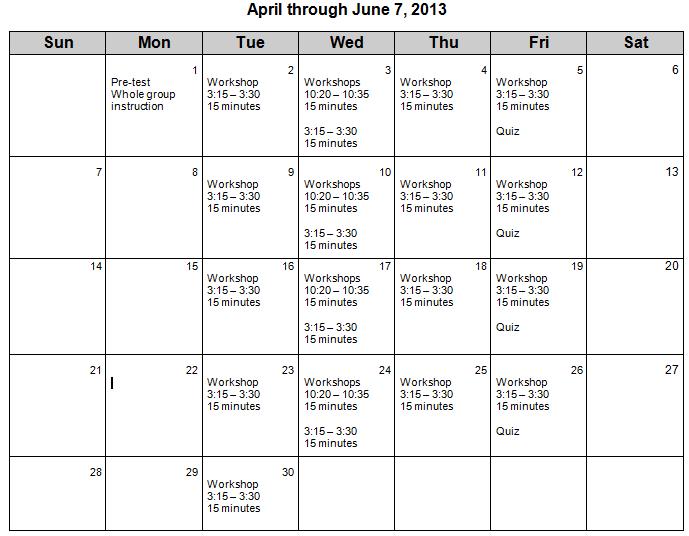
Timeline of Implementation
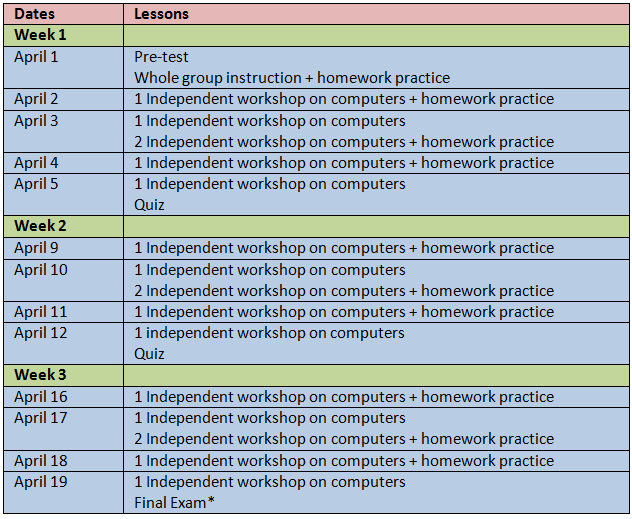
*For the purposes of data collection requirements in keeping with project deadlines, a final exam will be administered on April 19th. However, I plan to continue this intervention until June 7 or until students demonstrate 90% accuracy on a final exam of multiplication facts.
References for Phase III can be found on the References page on this site.
